
roblox script executor
Delta Executor: Roblox Script Executor
Run Lua scripts in your favorite Roblox games. Built mobile-first for Android and iOS, with PC support through an emulator.
> delta-executor v2.725
> platforms: android, ios, pc (emulator)
> last_updated: 2026-06-22
> official_domain: deltaxexecutor.com.co only
Heads up: the app shows a key entry popup the first time you open it. More on that below.
official domain: deltaxexecutor.com.co. we do not operate under any other name.
about.log
What Delta Executor actually does
Delta Executor is a third-party Roblox script executor, distributed as an APK for Android and as a sideloaded IPA for iOS. It lets you run custom LuaU scripts inside Roblox games to change how those games behave: automating repetitive actions, adding visual overlays, or unlocking gameplay options that aren't normally available.
Roblox runs its anti-cheat system, known as Byfron (now part of Hyperion), to detect and block tools like this. Executors in this category, Delta included, work by trying to stay ahead of how that detection evolves. That's an ongoing, moving target, not a solved problem, for every executor in this space, not just this one.
It was built mobile-first, which sets it apart from most executors that only run on desktop. Delta works natively on Android and iOS. PC and Mac users run the same Android APK through an emulator, BlueStacks or LDPlayer on Windows, or a Mac-compatible Android emulator like BlueStacks for Mac. That's what we mean by "Delta Executor for Windows" or "for Mac," since there's no separate native desktop build for either, the underlying app is the same one.
Common use cases include auto-farming in grind-heavy games, ESP overlays to see player or item locations, and basic automation scripts that handle repetitive tasks. You'll typically see Delta discussed alongside games like Blox Fruits, Pet Simulator, Brookhaven, Da Hood, Fisch, Arsenal, and similar high-traffic Roblox titles where scripted automation is common.
Some competing executors advertise a specific UNC (Unified Naming Convention) compatibility percentage to market script support. We don't publish a synthetic number here, since we can't independently verify how other tools calculate theirs, and a number we can't stand behind isn't worth more than no number. Per-version script and game compatibility is listed honestly in the changelog below instead.
Supported OS
Android, iOS, PC/Mac*
File size
112-170 MB
Version
v2.725
Updated
2026-06-22
*PC or Mac, via an Android emulator. No native desktop build.
Android minimum
Android 8.0+
iOS minimum
iOS 15.0+
RAM recommended
3 GB+ (mobile), 8 GB+ (PC emulator)
Storage needed
500 MB free
features.log
Features
Script library
Built-in script hub with categories for popular games like Blox Fruits and Pet Simulator, no copy-pasting from external Pastebin links required.
Cross platform
The same Android APK runs natively on phones and through an emulator on PC, no separate Windows download to maintain.
UI themes
Switch between light and dark interface themes, and resize the in-game script panel.
Direct downloads
No key, account, or payment step to download. Links go straight to the file; the app itself asks for a free key on first launch.
Update cadence
We aim to ship a patch within hours of a major Roblox update; see the real version history below for actual timing.
Beginner friendly
One-tap script execution from the built-in hub; no scripting knowledge needed to run a pre-made script.
on HWID and account safety
Some executors advertise built-in HWID (hardware ID) spoofing as a ban-recovery feature. We don't market a specific HWID spoofing claim here, since we'd rather not promise a capability around ban evasion that we can't fully stand behind. The honest safety section below covers what we can actually say about ban risk.
see it in action
Real screenshots from Delta Executor running on Roblox: the script hub, the execute menu, and the in-game floating controls.
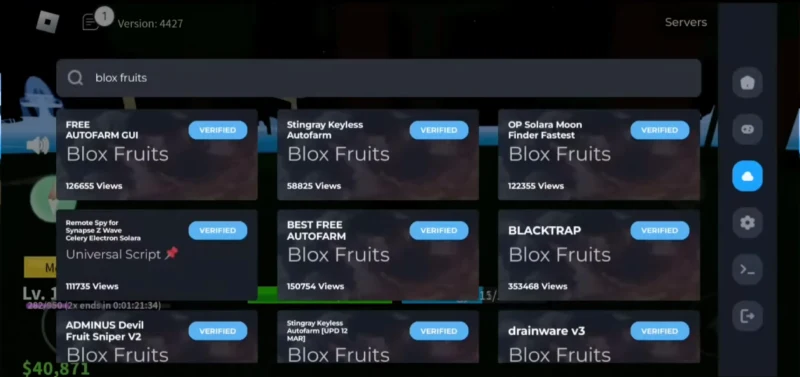
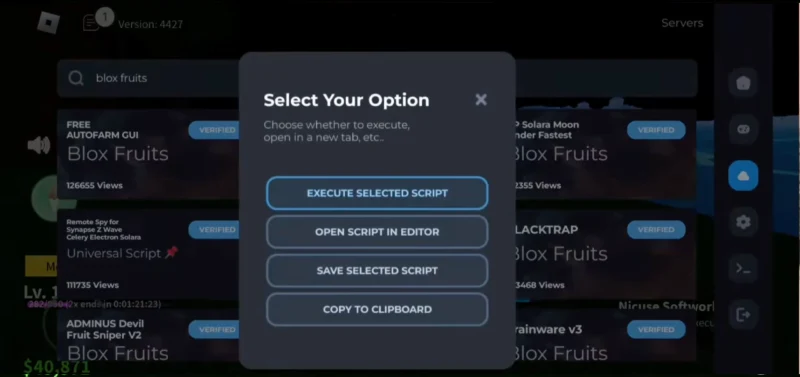
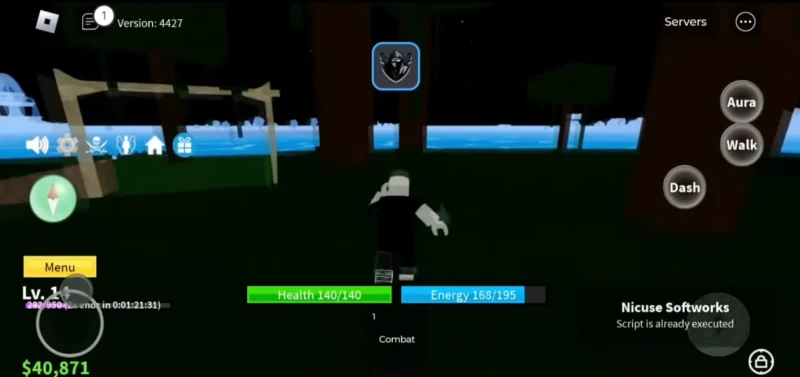
Downloading Delta Executor from unofficial sources puts your device at risk of malware and your Roblox account at risk of being banned or compromised. Always use our official download links at deltaxexecutor.com.co to make sure you're getting the genuine version.
safety_check.log
Is Delta Executor safe? An honest answer
Using any third-party script executor goes against Roblox's Terms of Use, and Roblox can ban accounts found using one. That risk is real, and we're not going to pretend otherwise just to make a sale.
Roblox's anti-cheat system, Byfron, now operating under the broader Hyperion umbrella, actively looks for executors like this one. Delta is built to work against current detection methods, and many users report long-term use without issues. But this is a moving target. Detection methods change with Roblox updates, and no executor, including this one, can honestly guarantee permanent, undetectable status. Treat any site that claims otherwise, including ours if we ever slip into that language, with skepticism.
If you choose to use Delta, use scripts responsibly and avoid obvious or disruptive cheating in public servers, since that's the behavior most likely to get reported and reviewed.
If your antivirus software flags Delta as a threat, this is common across this entire category of software, since executors interact with game memory in ways antivirus tools are designed to flag. It doesn't necessarily mean the file is malicious, but it does mean you should always confirm you downloaded it from deltaxexecutor.com.co specifically before deciding whether to trust the warning.
comparison.log
Delta vs. other executors
Here's an honest comparison against the field, not a one-sided one.
Download
Delta Executor
Direct link, no key or account step
Typical alternatives
Varies, some use key/ad-gateway systems
Mobile support
Delta Executor
Native Android and iOS
Typical alternatives
Most are PC-only
Update cadence
Delta Executor
Aims for same-day patches after Roblox updates
Typical alternatives
Varies by project, some lapse for weeks
Anti-cheat handling
Delta Executor
Built to work against current Byfron/Hyperion detection, like any active executor
Typical alternatives
Same ongoing arms race, regardless of marketing claims
Support
Delta Executor
Discord community and documentation
Typical alternatives
Varies, often community-run only
See the safety section above for the full picture on detection risk; the short version is no executor can honestly promise permanent bypass.
People also ask how Delta compares to specific named executors like Fluxus, Solara, Codex, and Arceus X. We don't have hands-on, current testing data on those tools to make a fair side-by-side claim, and we'd rather say that plainly than guess. What we can say honestly: Fluxus, Solara, and Codex are primarily PC-focused, while Delta's main differentiator is genuine native mobile support on Android and iOS. If mobile support is what you need, that's the real deciding factor regardless of how any of these tools compare on PC-only metrics.
last verified working
v2.725 was last confirmed working against the Roblox client version current as of 2026-06-22. Anti-cheat detection changes with every Roblox update, so "working" is a snapshot, not a permanent guarantee, check the changelog above for the most recent confirmation before assuming an older version still works on the current Roblox build.
get_delta.log
Getting Delta Executor
Four steps, no key, account, or payment to download. The only key step happens inside the app itself, after install, not on this site.
Choose your platform
Android, iOS, or PC through an emulator. Same app either way.
Download direct
No key, account, or payment to download. The link goes straight to the file.
Install it
Standard install steps for your platform. See the full guide on each download page.
Open the app
A key entry popup appears on first launch. Follow the link inside it, that step happens in the app, not on this site.
Pick your platform below, each page has the latest direct download link plus the full version history.
troubleshoot.log
Common issues and fixes
If Delta Executor isn't injecting or working, it usually comes down to one of these:
- -- You're running an outdated version of Roblox. Update Roblox from the official app store first.
- -- Your antivirus or device security settings are blocking the executor. Try temporarily disabling real-time protection during installation only.
- -- A recent Roblox update hasn't been patched for yet. Check our Discord or changelog for update status before assuming something is broken on your end.
- -- The app needs to be reinstalled. Uninstall completely, restart your device, then reinstall from deltaxexecutor.com.co.
verify.log
Verify your download and who's behind this
Given how many lookalike domains exist for this product, verifying what you downloaded matters more than it would for most software. Here's how to actually check it, not just take our word for it.
checking file integrity
Every release should ship with a published SHA-256 hash on its download page. After
downloading, run the file through a hash checker (built into Windows via
certutil -hashfile file.apk SHA256,
or any free online SHA-256 tool) and compare it against the hash listed on the download
page for your version. If they don't match exactly, don't run the file, redownload it
from deltaxexecutor.com.co instead.
who runs this
This site is operated by the Delta Executor Team. We're a small, independent group, not affiliated with Roblox Corporation in any way. You can reach us directly through Discord or Telegram below, both are checked regularly, not abandoned channels.
recent changes (android)
- v2.725 2026-06-22 207 MB
- + Updated to 2.725.1142
- + Still Undetected
- + Added Custom DNS Resolver (DnsResolve error fix)
- v2.724 2026-06-21 206 MB
- + Enhanced Execution Engine
- + Improved script execution speed.
- + Reduced execution latency.
iOS and Windows have their own version history on their download pages, since each platform updates on its own schedule.
Full release historyfaq.log